
Best AI Tools for Document Digitization
Updated
Short answer
The best tool depends on the output you need: searchable copies, structured fields, or records ready for a downstream workflow. Compare OCR and document-extraction tools using the same representative documents, then evaluate field-level accuracy, handling of missing values, and the work needed to review exceptions.
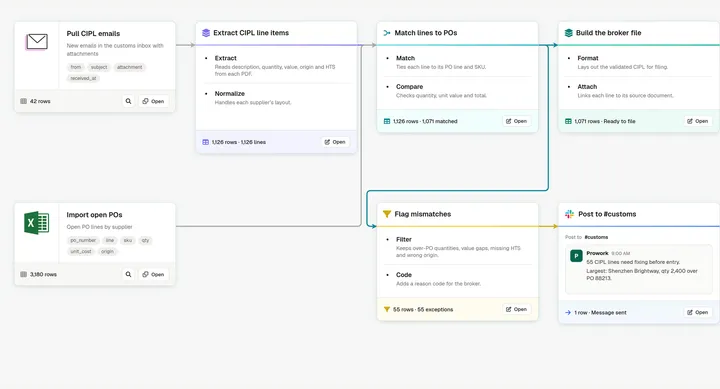
A Prowork Flow can extract fields from commercial invoices and packing lists, compare the extracted values with purchase-order data, and flag discrepancies for review.
Choose by the output
- Searchable PDF: Use an OCR tool such as Adobe Acrobat OCR when you need a searchable text layer.
- Structured fields: Evaluate a document capture tool such as ABBYY FlexiCapture against multi-page tables and layout variations.
- Validated business records: Use a workflow tool such as Prowork when you need to check extracted fields against source systems and send exceptions to an owner.
Worked example: evaluate ten packing lists
Specify expected shipment references, SKUs and quantities for a batch that includes both clear and poor scans. Measure correct, missing and incorrect fields separately; record the time a reviewer spends fixing the results.
FAQ
Frequently asked questions
Can you test accuracy without sending actual customer documents?
Yes. Use redacted or representative samples that retain the layout, scan quality, and field variations your team sees, and label the expected values before running the comparison.