
How do you automate freight audits?
Updated
Short answer
Match each carrier invoice line to the shipment record and the rate card in effect on the ship date. Calculate what the carrier should have charged, then send mismatched charges, duplicate bills, and unsupported fees to a review queue before payment.
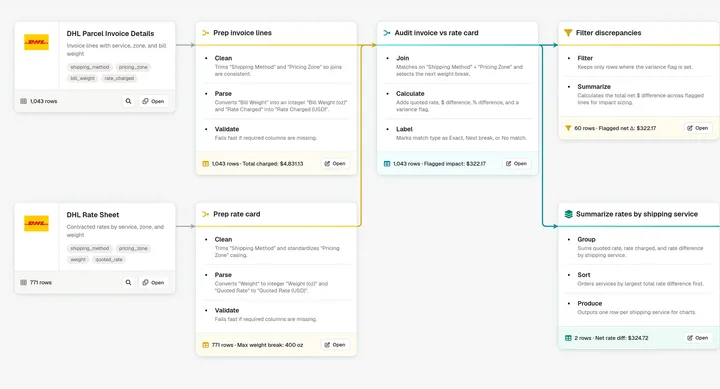
Prowork extracts line items from carrier PDFs, matches them to contracted rates by service, zone, and weight, and produces a filtered table of discrepancies. Schedule the Flow to repeat the audit each billing cycle.
What you need
- Carrier invoices: Invoice and shipment references, billed charges, fees, and weight.
- Shipment records: Ship date, service, zone or lane, weight, and any evidence for an extra service.
- Contracts and rate cards: Effective dates, base rates, fuel rules, and any fees for extra services.
How to check invoices before payment
- Standardize carrier names, shipment references, and units. Keep the original invoice data for review.
- Look for duplicates in the current batch and prior paid bills. Use shipment references and carrier details, not invoice number alone.
- Match each line to the applicable rate and recalculate base freight, fuel, and any supported fees.
- Send mismatches to a reviewer with the invoice line, expected charge, difference, and reason.
Worked example: A charge above the agreed rate
Say a carrier bills $30 for a parcel. The rate card and applicable fuel surcharge put the expected total at $26, and the shipment has no approved extra fees.
- Billed: $30
- Expected: $26
- Difference: $4 to review
Flag the line and attach the applicable rate and shipment record. The reviewer can confirm whether the carrier applied a valid fee or whether to dispute the charge.
Track exceptions after the audit
Record which exceptions were resolved, what was recovered, and how long each took to close. If the same issue recurs, check whether the audit rules, shipment data, or carrier billing need correcting.
FAQ
Frequently asked questions
Can you audit freight invoices that arrive as PDFs?
Yes. Extract the invoice line items into a table first, then validate required fields such as shipment reference, billed weight, and amount before comparing charges.
Should the audit automatically approve payment?
Keep audit and payment separate. Use the audit to identify discrepancies and record the evidence; keep approvals and payment in your ERP or accounts payable system.