
How to Automate Your Parcel Invoice Audits
Updated
Short answer
Join each carrier invoice line to a shipment, then recalculate the expected charge using the contracted service, zone, billable weight and applicable surcharges. Report differences with invoice references and supporting inputs so a reviewer can dispute or clear them.
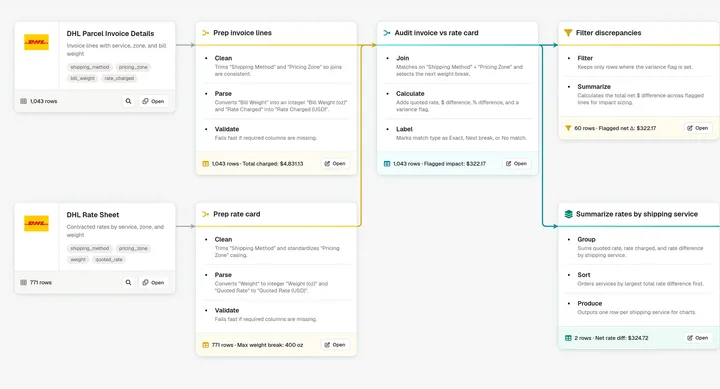
A Prowork Flow can extract line items from carrier PDFs, combine them with shipment and rate-card data, and output discrepancies for review on a schedule.
Prepare the inputs
Collect invoices, shipment files, and the rate card effective on each ship date. Normalize tracking numbers, service levels, zones and units, and distinguish package-level entries from invoice-level adjustments.
Recalculate and route exceptions
Calculate billable weight under the contract and apply the service base rate, fuel and any valid accessorials. Label missing data, duplicates and out-of-tolerance charges separately.
Worked example: check dimensional weight
A parcel weighs 8 lb, but the invoice bills it at 12 lb. Recalculate dimensional weight using the contract's divisor and rounding rules before calling it an error. If the correct billable weight is 10 lb, retain both rates and the tracking number for review.