
How to Find Out My HTS Code
Updated
Short answer
You can find your HTS (Harmonized Tariff Schedule) code by identifying your product’s description and classification within the U.S. International Trade Commission’s HTS database. Each HTS code corresponds to a category of imported goods and is used to determine the applicable tariff rate. To narrow the options, know your product’s material composition, function, and intended use.
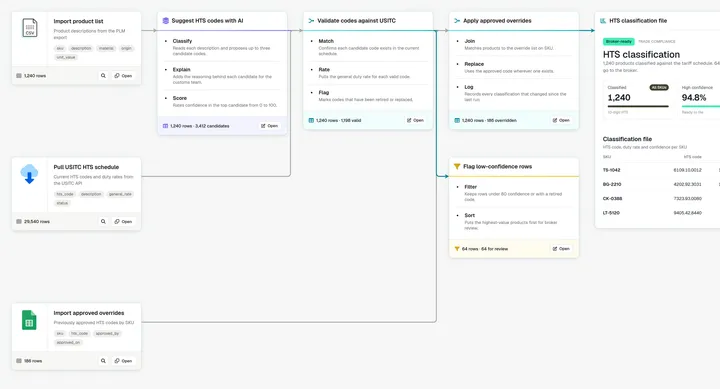
A Prowork Flow can read a product list, suggest candidate HTS codes, check them against the USITC reference, and flag uncertain classifications for a customs reviewer.
How to find an HTS code for your product
- Search the USITC HTS database using the product description or a likely keyword.
- Read the chapter and section notes, then compare the heading, subheading, and any similar classifications.
- Confirm the code with a licensed customs broker if the classification is unclear. You can request a binding ruling from U.S. Customs and Border Protection (CBP) if you need an official determination.
- Record the selected code, tariff schedule version, rationale, and any ruling so future shipments use a consistent classification.
Worked example: compare similar descriptions
A product listing calls an item a bag. Before choosing a code, establish whether it is a travel bag, handbag, or packaging, and record what the outer surface is made of. Search and compare the applicable descriptions and notes rather than copying a code from a listing with the same keyword.
FAQ
Frequently asked questions
Can I use a supplier’s six-digit HS code for a U.S. import?
Use it as a starting point. Check the full U.S. HTS classification and current schedule before filing; a six-digit HS subheading does not supply the U.S. tariff and statistical suffixes.