
How to Map GL Accounts
Updated
Short answer
Map each source transaction or account code to the corresponding account in your target general ledger (GL). Start with a crosswalk keyed by source system and account, add entity or cost-center rules only where needed, and test the resulting classifications before posting.
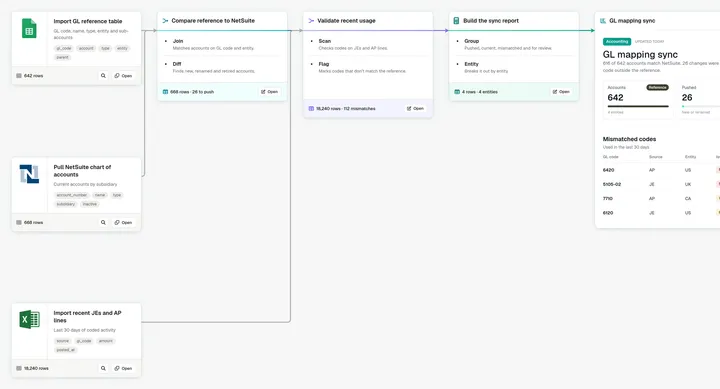
A Prowork Flow can compare recent entries against a GL reference table and flag unknown codes or differences across systems for accounting review.
Build and test the crosswalk
- Export source accounts and the approved target chart of accounts.
- Define the key and effective dates for each mapping rule.
- Test for missing and duplicate matches, and compare the resulting totals to the source.
- Have accounting approve exceptions and mapping changes before use.
Worked example: keep entity rules explicit
Two subsidiaries use code 6200 for different expenses. Key the table by both subsidiary and source code, so software fees and freight charges map to separate target accounts. Reject a row when its entity is missing instead of guessing.